Making a dumb IR curtain light smart with a Zigbee IR blaster
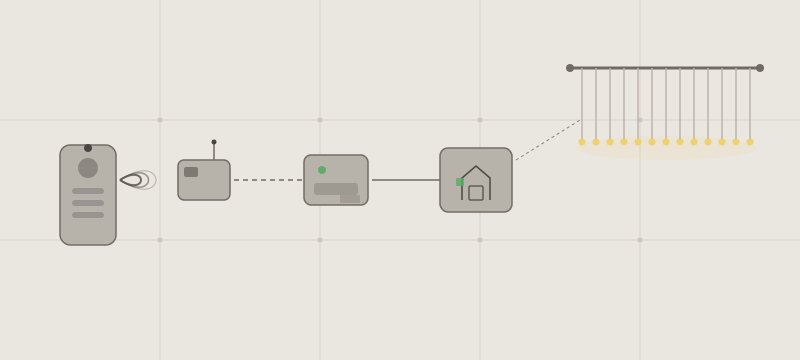
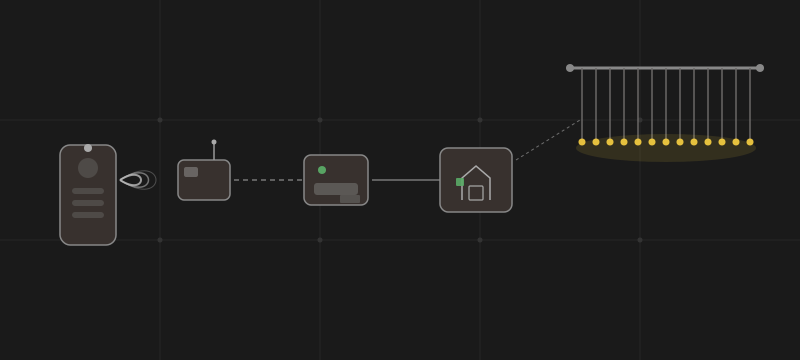
One of my rooms has a curtain LED strip that came with a small IR remote and nothing else - no Wi-Fi, no app, no Tuya cloud. Rather than replace it with something smarter, I picked up a cheap Zigbee IR blaster, taught it the remote’s commands, and wired the whole thing into Home Assistant as a proper light entity - complete with brightness control.
Hardware
- Curtain light - a generic LED curtain strip with a small IR receiver box. It has four brightness levels and separate remote buttons for dim down, dim up, on, and off.
- IR blaster - UFO-R11, a Tuya-powered Zigbee 802.15.4 IR controller. It runs on 2×AA batteries, has a 360° IR emission angle (so placement isn’t critical), and shows up in Zigbee2MQTT without any custom configuration.
Home Assistant prerequisites
This setup needs a working Zigbee coordinator, Zigbee2MQTT connected to an MQTT broker, and Home Assistant’s MQTT integration connected to the same broker. The original remote is needed to learn the IR commands.
The examples below use Zigbee2MQTT’s default base topic, zigbee2mqtt, and the device friendly name curtain_ir_blaster. If yours differ, update every command_topic to match: <base_topic>/<friendly_name>/set.
Pairing the IR blaster
Hold the reset button on the UFO-R11 until the LED flashes rapidly to enter pairing mode. It appears in Zigbee2MQTT automatically - no special quirk or manual pairing script needed. I gave it a friendly name in the Zigbee2MQTT config:
devices:
  '0xAABBCCDDEEFF':
    friendly_name: curtain_ir_blaster
Learning the IR commands
The UFO-R11 exposes a learn_ir_code action. Trigger it from the Exposes tab in the Zigbee2MQTT UI, point the original remote at the blaster, and press the button to capture. The learned code comes back on the last_received_code attribute as a base64-encoded string.
The 360° emission angle means you don’t need to aim the blaster precisely at the receiver - as long as the device is in the same room and has reasonable line of sight, it works reliably.
I captured four commands: power on, power off, brightness up (+1 step), brightness down (-1 step).
The entity structure
IR is fire-and-forget - the blaster has no idea whether the light responded. The state tracking has to live entirely in Home Assistant. My approach:
- MQTT
buttonentities - one per IR command, each publishes a fixed payload to the blaster input_number- tracks the current brightness step (1–4)- Template
light- exposes everything as a real light with brightness control
Step 1: buttons
Each MQTT button publishes its learned IR code to the blaster’s command topic when pressed. command_topic tells it where to publish, and payload_press contains the JSON message the blaster expects.
These are the codes learned from my remote. Replace each ir_code_to_send value with the corresponding code captured from yours:
# configuration.yaml
mqtt:
  - button:
      name: "Curtain lights on"
      command_topic: zigbee2mqtt/curtain_ir_blaster/set
      payload_press: >-
        {"ir_code_to_send": "BZAjxBE4AuAXAQGkBuAZA0ABQCfgAwHgAw/AC0AHwANAAUALD0KdkCPpCDgC//+QI+kIOAI="}
  - button:
      name: "Curtain lights off"
      command_topic: zigbee2mqtt/curtain_ir_blaster/set
      payload_press: >-
        {"ir_code_to_send": "BbkjrBE5AuAXAQGfBuAhA+ADAUA34AcBQBPAA0ABQAsPW525I+0IOQL//7kj7Qg5Ag=="}
  - button:
      name: "Curtain lights dim up"
      command_topic: zigbee2mqtt/curtain_ir_blaster/set
      payload_press: >-
        {"ir_code_to_send": "Bb8j8BE4AuAXAQGcBuAVA+ADAUAr4AcBQBPAA0ABwAvABwlqnb8j7wg4Av//4BIHAgg4Ag=="}
  - button:
      name: "Curtain lights dim down"
      command_topic: zigbee2mqtt/curtain_ir_blaster/set
      payload_press: >-
        {"ir_code_to_send": "BbUjvhE4AuAXAQGiBuAVA0ABQCNAAUAHQANAAeAPB0AB4AMbCVCdtSPgCDgC///gEgcCCDgC"}
The light configuration below expects the entity IDs button.curtain_lights_on, button.curtain_lights_off, button.curtain_lights_dim_up, and button.curtain_lights_dim_down. Check the actual IDs after loading the configuration, especially if similarly named entities already exist.
Step 2: brightness tracker
The light has four brightness steps. An input_number holds the current step, separately from whether the light is on or off:
input_number:
  curtain_lights_brightness:
    name: "Curtain lights brightness"
    initial: 4
    min: 1
    max: 4
    step: 1
With initial: 4, the tracker starts at maximum on every Home Assistant restart; it does not restore the previous step. Make sure the physical light is at maximum too, or adjust the helper to match its actual brightness before using the slider.
Step 3: template light
The interesting part. The light maps Home Assistant’s 0–255 brightness scale to the four physical steps, then calculates how many dim-up or dim-down presses are needed to reach the target:
template:
  - light:
    - name: "Curtain lights"
      # map HA's 0–255 to 4 discrete steps
      level: "{{ (states('input_number.curtain_lights_brightness')|int) * (255/4) }}"
      unique_id: curtain_lights

      turn_on:
        service: button.press
        target:
          entity_id: button.curtain_lights_on

      turn_off:
        service: button.press
        target:
          entity_id: button.curtain_lights_off

      set_level:
        # brightness 0 → turn off instead
        - if:
            - condition: template
              value_template: "{{ (brightness / (255/4)) | round == 0 }}"
          then:
            - service: button.press
              target:
                entity_id: button.curtain_lights_off
            - service: light.turn_off
              target:
                entity_id: light.curtain_lights
          else:
            # press dim up/down as many times as needed to reach the target step
            - repeat:
                count: >-
                  {{ (((brightness / (255/4)) | round)
                     - states('input_number.curtain_lights_brightness')|int) | abs }}
                sequence:
                  - if:
                      - condition: template
                        value_template: >-
                          {{ ((brightness / (255/4)) | round)
                             > states('input_number.curtain_lights_brightness')|int }}
                    then:
                      - service: button.press
                        target:
                          entity_id: button.curtain_lights_dim_up
                    else:
                      - service: button.press
                        target:
                          entity_id: button.curtain_lights_dim_down
                  # wait between presses so the light has time to respond
                  - delay:
                      milliseconds: 1000
            # update the tracker to the new step
            - service: input_number.set_value
              data:
                value: "{{ (brightness / (255/4)) | round }}"
                entity_id: input_number.curtain_lights_brightness
Applying and testing the configuration
Add the MQTT buttons, brightness helper, and template light to configuration.yaml. If you already have an mqtt:, input_number:, or template: section, merge the entries into it rather than adding a duplicate top-level key.
Run Developer Tools → YAML → Check configuration, then restart Home Assistant if the check passes. Test each button individually first: on and off should send the matching power commands, and each dim button should change the physical brightness by one step. If a button does nothing, check the MQTT topic, learned code, and blaster placement before testing the light entity.
With the physical light and helper both at step 4, set light.curtain_lights to 50%. It should send two dim-down commands, one second apart, and leave the helper at step 2. Raising it to 75% should send one dim-up command and move the helper to step 3. A different light may need a different number of steps or a longer delay between commands.
Result
The curtain light shows up in Home Assistant as a dimmable light entity. Setting it to 50% triggers two dim-down presses from maximum; setting it to 75% sends one dim-up from there. It works in automations, dashboards, and voice control like any other light.
The main caveat is the optimistic state: if someone uses the physical remote, Home Assistant’s brightness tracker drifts out of sync. A missed IR command or pressing the dim buttons directly also bypasses accurate tracking. To resynchronize, bring the physical light to maximum and set the helper to 4. For my use case this is rare enough not to matter, but it is a fundamental limitation of IR-only control.