Theming the Roborock map card in Home Assistant
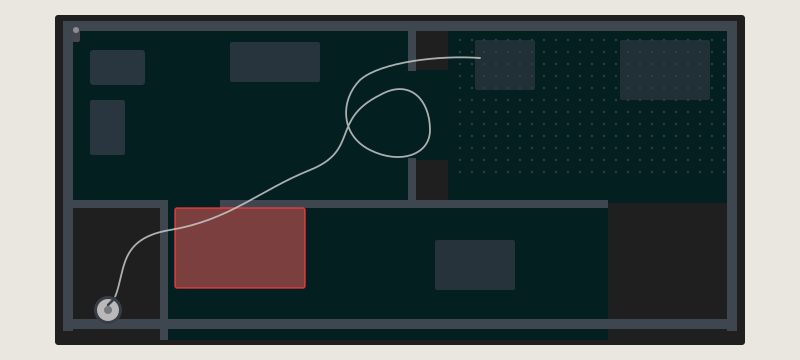
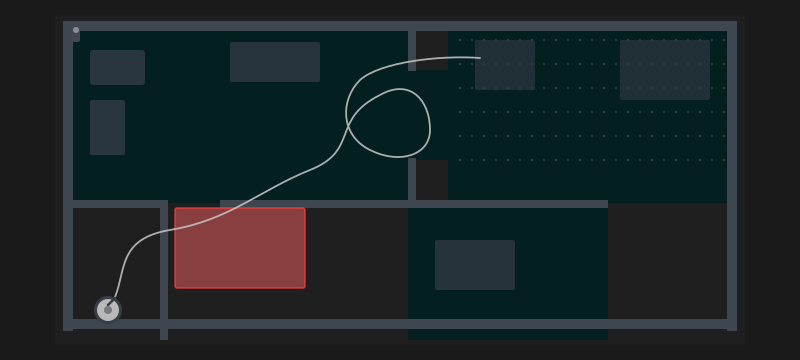
Getting a Roborock vacuum onto a Home Assistant dashboard involves layering a few different integrations. Getting the map to look right for a dark theme required going a level deeper than any of them officially support.
The integration stack
Three components work together to show a live, interactive vacuum map:
Roborock Custom Map
Roborock Custom Map is a custom integration that pulls the map tiles and vacuum state directly from the Roborock cloud API. It creates camera entities that stream the live map image and vacuum entities for the cleaner itself. Without this, the official Roborock integration only exposes basic controls - no map data.
Vacuum Card
vacuum-card is a polished HACS Lovelace card for showing vacuum status: battery level, current state (cleaning, docked, returning), and quick action buttons. It doesn’t show the map - it’s purely a status and control surface.
lovelace-xiaomi-vacuum-map-card
lovelace-xiaomi-vacuum-map-card is where the actual map rendering happens. It reads the camera entity from Roborock Custom Map and overlays interactive elements: rooms, go-to targets, zone cleaning, the robot’s current position, and its path trace. Internally it uses a Python library called vacuum_map_parser_base to parse and render the raw map data into a pixel map.
The colour problem
The map looks fine out of the box on a light background. On a dark dashboard it looks jarring - the default colours assume a white or near-white canvas. The inside floor area is rendered light, walls are dark, and the contrast is inverted relative to what makes sense on a dark theme.
The card itself doesn’t expose colour configuration. The colours live inside vacuum_map_parser_base, a Python package that ships with the integration. They’re defined as constants in:
/usr/local/lib/python{version}/site-packages/vacuum_map_parser_base/config/color.pyThere’s no YAML option, no card config key, no theme variable - just hardcoded tuples.
The fix: patch the library directly
The only way to change these colours is to modify color.py in place. I wrote a Python script that reads the file, replaces the colour tuples with custom values, and clears the __pycache__ so the changes take effect on the next HA restart.
import os
import re
import glob

PYTHON_VERSION = f"{os.sys.version_info.major}.{os.sys.version_info.minor}"
COLOR_FILE = f"/usr/local/lib/python{PYTHON_VERSION}/site-packages/vacuum_map_parser_base/config/color.py"
PYCACHE_DIR = f"/usr/local/lib/python{PYTHON_VERSION}/site-packages/vacuum_map_parser_base/config/__pycache__"
MARKER = "# Colors updated by update_colors.py"

if not os.path.isfile(COLOR_FILE):
    print(f"File not found: {COLOR_FILE}")
    exit(1)

with open(COLOR_FILE, 'r') as file:
    if MARKER in file.read():
        print("Already updated.")
        exit(0)

COLORS = {
    "MAP_INSIDE":        "3, 31, 31",       # cleanable floor - dark teal
    "MAP_OUTSIDE":       "31, 31, 31",      # outside map boundary - near-black
    "MAP_WALL":          "62, 71, 80",      # walls - dark blue-grey
    "MAP_WALL_V2":       "62, 71, 80",
    "GREY_WALL":         "62, 71, 80",
    "VIRTUAL_WALLS":     "62, 71, 80",
    "PATH":              "170, 170, 170",   # vacuum path trace - light grey
    "GOTO_PATH":         "0, 255, 0",
    "PREDICTED_PATH":    "255, 255, 0, 0",
    "CLEANED_AREA":      "127, 127, 127, 127",
    "ZONES":             "0XAD, 0XD8, 0XFF, 0X8F",
    "ZONES_OUTLINE":     "0XAD, 0XD8, 0XFF",
    "NO_GO_ZONES":       "224, 89, 91, 127",
    "NO_GO_ZONES_OUTLINE": "255, 0, 0",
    "CHARGER":           "70, 70, 78",
    "ROBO":              "170, 170, 170",
}

with open(COLOR_FILE, 'r') as file:
    content = file.readlines()

updated_content = []
in_colors = False
in_rooms = False

for line in content:
    if 'COLORS: dict[SupportedColor, Color] =' in line:
        in_colors = True
    if in_colors and '}' in line:
        in_colors = False

    if 'ROOM_COLORS: dict[str, Color] =' in line:
        in_rooms = True
    if in_rooms and '}' in line:
        in_rooms = False

    if in_colors and 'SupportedColor.' in line:
        match = re.search(r'SupportedColor\.([A-Z0-9_]+):\s*\(([^)]+)\)', line)
        if match and match.group(1) in COLORS:
            line = re.sub(r'\(([^)]+)\)', f'({COLORS[match.group(1)]})', line)

    if in_rooms:
        line = re.sub(r'\(([^)]+)\)', r'(21, 21, 21)', line)

    updated_content.append(line)

updated_content.append(f"\n{MARKER}\n")

with open(COLOR_FILE, 'w') as file:
    file.writelines(updated_content)

for pyc_file in glob.glob(f"{PYCACHE_DIR}/*.pyc"):
    os.remove(pyc_file)

print(f"Updated {COLOR_FILE} and cleared cache.")
The marker at the end prevents the script from double-patching if it’s called again - on a second run it detects the marker and exits early.
Room colours are handled separately: the ROOM_COLORS dictionary defines per-room tints, but I flatten them all to a uniform very dark value (21, 21, 21) so individual rooms don’t stand out on a dark canvas. The subtle difference from MAP_OUTSIDE (31, 31, 31) is enough to show the room boundary without a colourful rainbow effect.
Wiring it into Home Assistant
The script is stored at /config/python_scripts/update_roborock_colors.py inside the HA container. In configuration.yaml it’s registered as a shell command:
shell_command:
  update_roborock_colors: 'python3 /config/python_scripts/update_roborock_colors.py'
I call this from a startup automation so the colours are applied after every HA restart - which matters because integration updates can overwrite the patched file and revert to the defaults. The shell command can also be triggered manually from Developer Tools → Services during development.
The awkward reality
This is a fragile approach. Every time vacuum_map_parser_base updates via pip, the patch is gone. Every time Python version bumps, the path changes. The marker prevents idempotency issues but doesn’t protect against updates.
A better long-term fix would be for lovelace-xiaomi-vacuum-map-card to expose colour configuration in its Lovelace card config, or for vacuum_map_parser_base to support a user-provided colour override file. Until either happens, patching the installed package on startup is the practical path.